
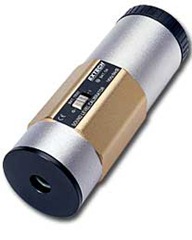
エクステック校正器 accommodate Sound Level Meters with 0.5” and 1” microphones. The Calibrator’s die-cast aluminum housing is built for ruggedness and durability. The 407744 provides a 94dB校正 output signal while the 407766 provides both 94dB and 114dB outputs. This professional calibrator, with proper care, will provide years of safe reliable service.
| Output signals |
407744: 94dB |
| Output signal accuracy | 407744: ± 0.5dB; 407766: ± 0.5dB (94dB), ±0.8dB (114dB) |
| Accuracy of output signal frequency | ± 5% |
| Compatible microphones sizes | 0.5” and 1” microphones |
| Total Harmonic Distortion (THD) | <2%@94dB, <5%@114dB (407766) |
| Operating temperature | 32 to 122oF (0 to 50oC) |
| Power supply | Two (2) 9V batteries |
| Power consumption | Approx. 10mA DC |
| Battery check | Status LED |
| 寸法 | 2.2” diameter x 5.7” length (50 x 145mm) |
| 重さ | 0.75 lbs. (340g) |
| Output signal frequency | 1KHz sine wave |
Description
1. ½” Microphone adaptor
2. 407766: OFF-94dB-114dB switch, 407744: OFF-BATTERY TEST-94dB switch
3. 407766: POWER-ON / LOW-BATTERY status LED, 407744: BATTERY OK LED
4. Battery compartment cap
* To remove the ½” adaptor, pull straight down as shown in diagram below.
Operation
Theory of Operation
407744 サウンド レベル キャリブレータは、1 KHz で 94dB の正弦波を生成します。 407766 は、1kHz で 94dB および 114dB の正弦波を生成します。騒音計のマイクが校正器に挿入されると、騒音計は信号を拾い、信号を dB (デシベル) 単位で表示します。騒音計は(必要に応じて)校正器の出力信号とできるだけ一致するように調整する必要があります(図を参照)。
手順。
1. 図のように、マイクをキャリブレーターのマイクキャビティに挿入します。完全に挿入されていることを確認してください。 1/2 インチのマイクには 1/2 インチのマイク アダプタ (キャリブレータに付属) を使用してください。 1 インチマイク用のアダプターを取り外します。
2. 407744 で、機能スイッチを「I」(電源オン) の位置にスライドさせます。ユニットに電源が投入されるとすぐに、キャリブレーショントーンが生成されます。 407766 では、機能スイッチを必要に応じて 94dB または 114dB の位置にスライドさせます。キャリブレータは、スイッチが設定されるとすぐに信号を生成します。
3. 騒音計の表示を読み取ります。騒音計は校正器の設定に応じて 94dB または 114dB を示すはずです。騒音計が校正器の信号(仕様内)と一致しない場合は、「操作」セクションで説明されているように調整してください(通常は、フロントパネルまたはサイドパネルのポット調整)。右図を参照してください。
4. 機能スイッチを OFF の位置にスライドさせ、マイクを取り外します。
バッテリーチェック
On the 407744, check the condition of the battery by moving the function switch to the ‘Battery test’ position. The Battery status LED should illuminate if the battery is OK. If it does not light, replace the 9V battery. On the 407766, the POWER-ON / LOW-BATTERY LED glows brightly when the battery is fresh and dimly when the battery is weak.
Battery Replacement
Lift off battery compartment cap (shown in the Description section) to access the two (2) 9V batteries. Remove the batteries and replace with new alkaline 9V batteries. Replace the cap.

nice